


Laptop Not Turning On? Step-by-Step Troubleshooting & Repair Guide
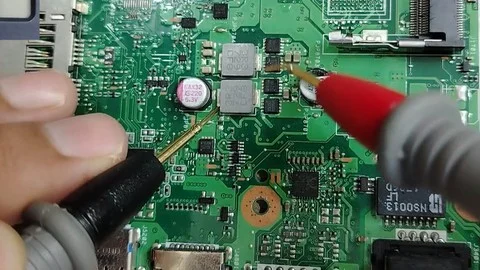
Few things spark instant panic like pressing your laptop's power button and getting absolutely nothing in return—no status lights, no spinning fan noise, and a completely black, unresponsive screen. Whether you rely on an HP ZBook workstation for design work, a Lenovo ThinkPad for office tasks, or a MacBook for creative production, a sudden power failure can disrupt your workflow instantly.
Before assuming your laptop's motherboard is completely fried, there are several hardware isolation checks you can perform right at home or in your office. In this guide, the technical team at Jlite Technologies outlines how to safely isolate a power issue and explains when your machine requires professional micro-soldering intervention at our Nairobi CBD workshop.
The Safe Power Isolation Process
Perform these specific checks sequentially to identify if the issue lies outside your core laptop hardware:
- Isolate the Wall Outlet & Charger: Avoid extension power strips for this test. Plug your power adapter directly into a known active wall socket. Inspect the power cable for exposed copper wiring, sharp bends, or a burnt odor. If your charger has an LED indicator light, verify that it illuminates when connected.
- Perform a Hard Power Flea Reset: Residual static electricity built up on your motherboard capacitors can lock up the power sequencing management chip. Unplug the charging cable. If your laptop has a removable external battery, unclip it. Hold down the physical power button firmly for a full 30 to 45 seconds. Reconnect only the AC wall charger and attempt to power it on.
- Disconnect All Peripheral Cables: External USB hubs, wireless mouse dongles, HDMI monitors, and printers can develop individual ground shortages. Disconnect every single connection and try a fresh boot.
- Look for Signs of Life (The Black Screen Test): Turn on your machine in a dark room. Do you hear the faint hum of an internal cooling fan or a hard drive platter spinning up? Does the caps lock key light up when tapped? If yes, your laptop is turning on, but your LCD panel, display cable, or graphics layer is failing.
Common Structural Reasons Your Laptop Is Completely Dead
If the steps above yield no results, your machine likely has an internal hardware failure. The most common issues identified at our repair desk include:
1. Damaged DC Power Charging Jack
Frequent plugging and pulling can crack the solder joints connecting your internal charging port to the main circuit board. If you have to jiggle the power pin at a specific angle to get a charge light, the DC jack is broken and needs replacement before it sparks and scorches nearby circuits.
2. Internal Mainboard Short Circuits
Sudden electrical power surges from the main lines (common during power dropouts), cheap replacement chargers, or minor fluid contact can pop tiny ceramic capacitors or power management chips (MOSFETs). When these components blow, they create an electrical dead-end that prevents power distribution across the board.
3. Corrupt BIOS/CMOS Firmware Profile
The basic input/output system (BIOS) instructs your computer hardware how to initialize safely. If a system update is interrupted or the internal coin-sized CMOS battery dies completely, the motherboard will lose its instructions and refuse to clear the post phase.
⚠️ Warning Against DIY Motherboard Repairs: Modern laptops use highly dense multi-layered circuit designs. Attempting to repair internal power issues at home without professional diagnostic tools, an anti-static work area, and specialized micro-soldering gear can easily cause permanent damage to your CPU.
If your laptop is beyond economical repair or the motherboard replacement cost is too high, consider exploring our affordable refurbished laptops as a cost-effective alternative. We have tested and certified HP, Dell, and Lenovo laptops available at our Nairobi showroom.
Frequently Asked Questions
How much does it cost to fix a laptop that won't turn on in Nairobi?
The cost depends entirely on the root cause. A simple power adapter replacement costs between KSh 1,500 and KSh 3,500. Internal charging port (DC Jack) repairs range from KSh 2,500 to KSh 4,500. Complex chip-level motherboard repair involving micro-soldering starts around KSh 5,000. Jlite Technologies offers completely free diagnostic assessments if you do your repair with us.
Could a bad laptop battery prevent it from turning on even when plugged in?
Yes, absolutely. If an internal laptop battery experiences a severe internal short circuit, it can trigger the motherboard's protective circuit breaker, blocking all electrical power entry. Unplugging the battery internally often allows the laptop to boot smoothly on charger power alone.
How long does it take to fix a laptop that won't turn on in Nairobi?
Most power-related repairs are completed within 2 to 4 hours at our Nairobi CBD workshop. Complex motherboard repairs involving micro-soldering may take 24 to 48 hours. We always provide a realistic timeline upfront after the free diagnostic.
Do you offer a warranty on laptop repairs?
Yes! All repairs at Jlite Technologies come with a comprehensive 6-month warranty covering both replacement parts and repair craftsmanship.
What laptop brands do you repair in Nairobi?
We repair all major laptop brands including HP, Dell, Lenovo, ASUS, Acer, and Apple MacBooks at our Nairobi CBD workshop at Revlon Professional Plaza.
Leave a Comment
Your email address will not be published. Required fields are marked *