


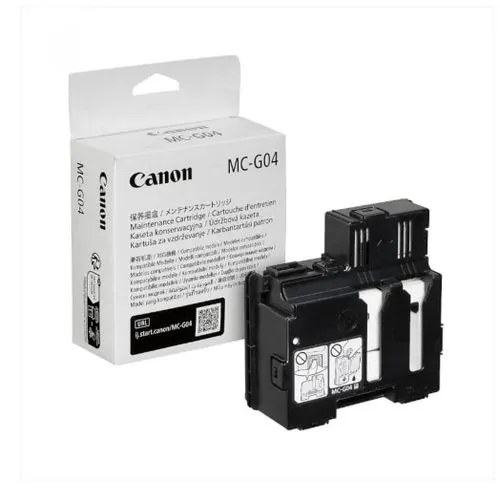
Product details
Canon MC-G04 Maintenance Cartridge (5813C001) | Genuine Waste Ink Absorber for PIXMA MegaTank Printers | Nairobi Kenya.
Looking for the Canon MC-G04 Maintenance Cartridge in Nairobi or anywhere in Kenya? Jlite Technologies supplies genuine Canon maintenance cartridges, ink bottles, printers, and accessories at competitive prices with fast nationwide delivery.
Genuine Canon MC-G04 Maintenance Cartridge — replacement waste ink absorber for select Canon PIXMA MegaTank printers, with an estimated capacity of up to 10,000 pages. Keeps your printer running smoothly by safely collecting excess ink during cleaning cycles. Genuine Canon part, available now in Nairobi CBD.
The Canon MC-G04 Maintenance Cartridge (Part Number: 5813C001) is a genuine Canon replacement cartridge designed for selected Canon PIXMA MegaTank printers. It safely collects excess ink produced during printhead cleaning operations and normal printing, helping protect your printer from internal ink leakage while ensuring smooth and reliable performance.
Unlike older printers that required servicing to replace waste ink absorbers, the MC-G04 is user-replaceable, allowing quick maintenance without visiting a service centre.
Key Features
Genuine Canon Maintenance Cartridge
Model: MC-G04
Part Number: 5813C001
User-Replaceable Design
Collects Waste Ink During Cleaning Cycles
Helps Maintain Print Quality
Protects Internal Printer Components
Easy Installation
No Special Tools Required
Original Canon Accessory
Technical Specifications
Specification | Details |
|---|---|
Brand | Canon |
Model | MC-G04 |
Part Number | 5813C001 |
Product Type | Maintenance Cartridge / Waste Ink Cartridge |
Function | Waste Ink Collection |
Installation | User Replaceable |
Colour | Black |
Genuine Product | Yes |
Compatible Canon PIXMA MegaTank Printers
The Canon MC-G04 is compatible with many Canon PIXMA MegaTank printer models, including:
PIXMA G1430
PIXMA G1530
PIXMA G2430
PIXMA G2470
PIXMA G2570
PIXMA G3430
PIXMA G3470
PIXMA G3471
PIXMA G3472
PIXMA G3570
PIXMA G3571
PIXMA G3572
PIXMA G4470
PIXMA G4570
Always confirm your exact printer model before purchasing.
Why You Need the MC-G04
The maintenance cartridge stores ink used during automatic printhead cleaning and excess ink overspray. Replacing it when prompted helps:
Maintain consistent print quality
Prevent waste ink overflow
Protect internal printer components
Reduce the need for service-centre repairs
Keep your printer operating reliably
Ideal For
Home Users
Students
Small Businesses
Schools
Offices
High-Volume Printing Environments
Package Contents
1 × Genuine Canon MC-G04 Maintenance Cartridge (5813C001)
Why Buy from Jlite Technologies?
Genuine Canon Consumables
Competitive Prices in Kenya
Fast Nationwide Delivery
Secure M-Pesa Payments
Expert Technical Support
Manufacturer Warranty
Nairobi CBD Pickup Available
Frequently Asked Questions
What does the Canon MC-G04 Maintenance Cartridge do?
It collects waste ink generated during printhead cleaning and printing operations, helping keep the printer functioning properly.
When should I replace it?
Your Canon printer will display a notification when the maintenance cartridge is nearly full or has reached the end of its service life.
Can I reuse the maintenance cartridge?
No. The MC-G04 is a consumable item and should be replaced with a new genuine cartridge once it becomes full.
Is it easy to install?
Yes. Canon designed the MC-G04 to be user-replaceable, and installation can be completed in a few minutes without special tools.
Does replacing the maintenance cartridge reset the printer automatically?
On compatible Canon MegaTank models, installing a new genuine MC-G04 is normally recognized automatically by the printer.
Getting a maintenance cartridge error on your Canon printer? Order your genuine Canon MC-G04 Maintenance Cartridge online with secure M-Pesa payment, or message us directly on WhatsApp for quick assistance and same-day Nairobi delivery.
Visit our showroom at Revlon Professional Plaza, 2nd Floor, Biashara Street, Nairobi CBD, or order online for delivery across Nairobi, Mombasa, Kisumu, Nakuru, Eldoret, Thika, Nyeri, Meru, Machakos, and all counties in Kenya.
We also stock Canon MegaTank printers, Canon GI-series ink bottles, laser printers, toner cartridges, scanners, networking equipment, laptops, and office technology solutions, backed by expert technical support and reliable after-sales service.



There are no reviews yet.