


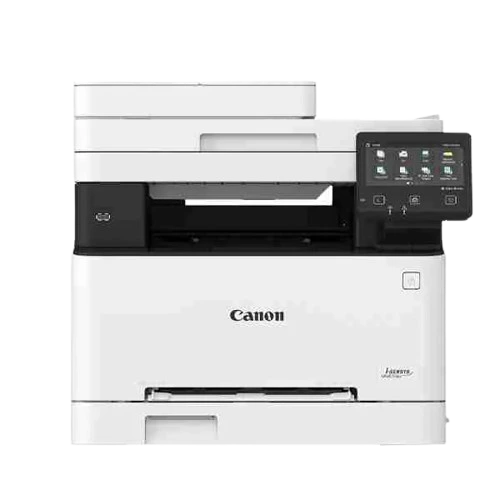
Product details
Canon i-SENSYS MF651Cw A4 Colour Laser MFP Printer – Wi-Fi, Print, Scan & Copy | Nairobi, Kenya.
The Canon i-SENSYS MF651Cw is a compact A4 colour laser multifunction printer designed for small and medium-sized businesses, offices and professional home-office environments in Kenya.
It combines colour printing, scanning and copying with Wi-Fi, Ethernet and USB connectivity, allowing businesses to print from computers, mobile devices and networked workstations. Canon rates the printer at up to 18 pages per minute (ppm) for A4 documents, with a 250-sheet paper capacity and a 12.7 cm colour touchscreen for intuitive operation.
The MF651Cw also supports mobile and cloud-oriented workflows, including Canon PRINT Business, Apple AirPrint and Mopria, making it a practical choice for connected modern offices.
Canon i-SENSYS MF651Cw A4 Colour Laser MFP Description:
- A4 Colour Laser Multifunction Printer
- Print, Scan & Copy
- High-quality colour laser printing
- Print speed up to 18 ppm A4
- Large 12.7 cm colour touchscreen
- 250-sheet standard paper cassette
- Additional 1-sheet manual feed
- Built-in Wi-Fi
- Gigabit Ethernet
- USB 2.0 Hi-Speed
- Mobile printing support
- Cloud printing/scanning support
- Secure PIN printing
- Print directly from compatible USB memory
- Up to 999 multiple copies
- Automatic document feeder for multi-page scanning/copying
- Uses Canon Cartridge 067 Black
- Cartridge 067 Cyan
- Cartridge 067 Magenta
- Cartridge 067 Yellow
- Ideal for small and medium offices
- Suitable for Kenyan businesses and professional workgroups
Canon i-SENSYS MF651Cw A4 Colour Laser MFP Features:
Professional Colour Laser Printing
Produce sharp black text and vibrant colour documents for quotations, reports, presentations, marketing materials and business correspondence.
Up to 18 ppm
The MF651Cw can print and copy at up to 18 pages per minute for A4 single-sided documents, making it suitable for everyday office workloads.
250-Sheet Paper Capacity
The standard cassette accommodates up to 250 sheets, with an additional manual feed slot for special media and individual sheets.
Wi-Fi & Mobile Printing
Connect the printer to your office network wirelessly and print from compatible smartphones and tablets using supported Canon and mobile-printing technologies.
Ethernet Connectivity
For businesses that prefer a wired network connection, the MF651Cw supports Ethernet networking.
12.7 cm Colour Touchscreen
The large colour touchscreen provides an intuitive interface for accessing printer, scanner and copier functions.
Secure Printing
The printer supports Secure PIN Print, helping prevent confidential documents from being released automatically before the authorised user is ready to collect them.
Specifications
| Specification | Canon i-SENSYS MF651Cw |
|---|---|
| Brand | Canon |
| Series | i-SENSYS |
| Model | MF651Cw |
| Product Type | Colour Laser Multifunction Printer |
| Functions | Print, Scan, Copy |
| Printer Type | A4 Colour Laser |
| Print Speed | Up to 18 ppm A4 |
| A5 Landscape Speed | Up to 38 ppm |
| Print Resolution | Up to 1200 × 1200 dpi |
| First Print – Mono | Approx. 10.4 seconds |
| First Print – Colour | Approx. 10.5 seconds |
| Warm-Up Time | Approx. 13 seconds or less |
| Paper Input | 250-sheet cassette + 1-sheet manual feed |
| Maximum Paper Input | Approx. 251 sheets |
| Paper Output | Up to 100 sheets |
| Scanner Type | Colour scanner |
| Optical Scan Resolution | Up to 600 × 600 dpi |
| Enhanced Scan Resolution | Up to 9600 × 9600 dpi |
| Scan Speed – Mono | Up to 27 ipm |
| Scan Speed – Colour | Up to 14 ipm |
| Copy Speed | Up to 18 cpm A4 |
| Copy Resolution | Up to 600 × 600 dpi |
| Maximum Copies | Up to 999 |
| Control Panel | 12.7 cm colour LCD touchscreen |
| Wi-Fi | Yes |
| Wi-Fi Direct | Yes |
| Ethernet | 10/100/1000Base-T |
| USB | USB 2.0 Hi-Speed |
| Mobile Printing | Canon PRINT Business, AirPrint, Mopria |
| Cloud Connectivity | Google Drive, Dropbox, OneDrive |
| Secure Printing | Secure PIN Print |
| Memory | 1GB |
| Processor | 800MHz × 2 |
| Black Toner | Canon Cartridge 067 Black |
| Colour Toners | Canon Cartridge 067 C/M/Y |
| Recommended Monthly Volume | 250–2,500 pages |
| Maximum Duty Cycle | Up to 30,000 pages/month |
| Dimensions | Approx. 451 × 460 × 360mm |
| Weight | Approx. 18.9kg |
| Power Supply | 220–240V, 50/60Hz |
Print, Scan & Copy in One Machine
The Canon MF651Cw combines three essential office functions:
Print professional colour and black-and-white A4 documents.
Copy
Make quick copies of documents directly from the printer’s control panel.
Scan
Digitise documents for storage, email, USB or computer-based workflows.
This makes it particularly useful for offices that want to reduce the number of separate devices occupying desk space.
Wireless & Network Connectivity
The MF651Cw is designed for connected office environments.
Wi-Fi
Connect the printer wirelessly to your office network.
Ethernet
Connect directly to your business network using Ethernet.
USB
Connect directly to a computer through USB 2.0 Hi-Speed.
Mobile Printing
Supported mobile workflows include:
- Canon PRINT Business
- Apple AirPrint
- Mopria
- Canon Print Service Plug-in
Canon also supports printing and scanning with selected cloud services including Google Drive, Dropbox and OneDrive.
Security Features
For businesses handling confidential documents, the MF651Cw provides useful security functions.
Secure PIN Print
Documents can be protected with a PIN so that sensitive print jobs are not simply released immediately.
Network Security
The printer supports modern network-security features including secure communication protocols and network-management functions.
This makes the MF651Cw useful for:
- Accounting offices
- Legal offices
- HR departments
- Schools
- Medical/administrative offices
- Financial departments
- Corporate offices
Toner Information
The Canon MF651Cw uses the Canon Cartridge 067 toner family.
| Toner | Cartridge |
|---|---|
| Black | Cartridge 067 Black |
| Cyan | Cartridge 067 Cyan |
| Magenta | Cartridge 067 Magenta |
| Yellow | Cartridge 067 Yellow |
A Kenyan listing specifies approximately 1,350 pages for Black and 1,250 pages for each colour cartridge, although actual yields depend on the exact cartridge type and printing conditions.
Recommended Monthly Workload
Canon-oriented specifications list a recommended monthly print volume of approximately 250–2,500 pages, with a maximum duty cycle of up to 30,000 pages per month.
For Jlite customers, this makes the MF651Cw particularly appropriate for small and medium offices with regular but not industrial-scale printing requirements.
Ideal For:
Small & Medium Businesses
Handle everyday colour documents, reports, quotations, invoices and correspondence.
Accounting Offices
Print financial reports, invoices, statements and business documentation.
Law Firms
Produce professional documents and scan paperwork into digital formats.
Schools & Training Institutions
Print administrative documents, educational materials and reports.
Clinics & Professional Offices
Useful for forms, reports, correspondence and document archiving.
Home Offices
A strong option for professionals who require colour laser printing and scanning from home.
SMEs & Retail Businesses
Useful for quotations, invoices, price lists, marketing documents and office administration.
Why Choose Canon i-SENSYS MF651Cw?
One Machine, Three Functions
Print, scan and copy without needing separate office machines.
Colour Laser Technology
Get consistent colour output and sharp business documents.
Connected Office
Wi-Fi, Ethernet and USB provide flexible connectivity options.
Mobile-Friendly
Print from compatible smartphones and tablets using supported mobile-printing services.
Large Touchscreen
The 12.7 cm colour touchscreen simplifies everyday operation.
Business Security
Secure PIN printing helps protect confidential documents.
Practical Paper Capacity
The 250-sheet main cassette reduces the need for frequent paper loading.
Canon MF651Cw vs Ink Tank Printer
| Feature | Canon MF651Cw | Colour Ink Tank Printer |
|---|---|---|
| Technology | Colour Laser | Inkjet |
| Print Speed | Up to 18 ppm A4 | Model dependent |
| Colour | Yes | Yes |
| Scan | Yes | Usually |
| Copy | Yes | Usually |
| Wi-Fi | Yes | Model dependent |
| Toner/Ink | Toner | Liquid ink |
| Best Use | Business documents | High-volume economical printing |
| Colour Documents | Excellent | Excellent |
| Occasional Printing | Good | Can be affected by ink drying |
| Office Network | Excellent | Model dependent |
Canon i-SENSYS MF651Cw A4 Colour Laser MFP Frequently Asked Questions:
Where can I buy Canon i-SENSYS MF651Cw in Kenya?
You can order the Canon i-SENSYS MF651Cw from Jlite Technologies in Nairobi CBD, with delivery available across Kenya.
Is the Canon MF651Cw a colour printer?
Yes. It is an A4 colour laser multifunction printer.
Can the Canon MF651Cw scan and copy?
Yes. It provides printing, scanning and copying in one device. Canon officially identifies it as a 3-in-1 colour laser MFP.
Does the Canon MF651Cw have Wi-Fi?
Yes. It supports Wi-Fi connectivity as well as Ethernet and USB.
How fast is the Canon MF651Cw?
It prints at up to 18 pages per minute for A4 documents.
Does it print in black and white?
Yes. It can print both colour and monochrome documents.
Does it have an ADF?
Yes. The MF651Cw has an automatic document feeder, useful for multi-page scanning and copying. Kenyan listings specify a capacity of up to 50 sheets.
How much paper can it hold?
The standard paper cassette holds 250 sheets, with an additional manual feed slot.
Can I print from my phone?
Yes. The printer supports mobile printing through technologies including Canon PRINT Business, Apple AirPrint and Mopria.
Can I connect it using Ethernet?
Yes. Ethernet is available for wired office networking.
Can I connect it directly to a computer?
Yes. It supports USB 2.0 Hi-Speed connectivity.
Can it print from Google Drive or Dropbox?
Yes. Canon lists cloud connectivity for services including Google Drive, Dropbox and OneDrive.
Does the MF651Cw support automatic duplex printing?
Do not advertise automatic duplex printing for the MF651Cw unless your exact regional configuration confirms it. Some third-party Kenyan listings incorrectly or inconsistently describe duplex capabilities. The safer specification for Jlite is to state the verified print function rather than promise automatic duplex.
Does the Canon MF651Cw have fax?
No. The MF651Cw is a 3-in-1 printer: print, scan and copy. Canon’s official product page does not list fax as one of its functions.
What toner does the Canon MF651Cw use?
It uses the Canon Cartridge 067 toner family: Black, Cyan, Magenta and Yellow.
Is the MF651Cw suitable for a small office?
Yes. Canon positions it for small and medium-sized businesses, while its recommended monthly volume is approximately 250–2,500 pages.
Is it suitable for heavy printing?
It has a stated maximum duty cycle of up to 30,000 pages/month, but the recommended monthly volume is substantially lower at approximately 250–2,500 pages. For continuous high-volume production printing, a higher-duty commercial MFP would be more appropriate.
Order on WhatsApp | Request a Quote | Available Canon Printers



There are no reviews yet.